For years, every time I went to the dentist, the hygienist would be on my case about not flossing. I honestly don’t understand why I was once a flossing failure, but I do know why I’m now a flossing fanatic. I changed my habits using a simple approach that can work for you, too, whether your new habit is flossing or something even more important.
No Oprah Moments Required
I didn’t have an emotional breakthrough with flossing by recounting a horrible incident in the dental chair when I was a child. I do like talking about the time the dentist hit a nerve while giving me an injection (it was AWFUL!), however talking it out didn’t get me to floss. Oprah is a case study in the lack of relationship between understanding a bad habit and ending it. So are our pets. You can train your dog to stay off the couch without having him recline on one for psychoanalysis, thankfully. You can develop a healthy habit (or change an unhealthy one) without understanding the roots of your behavior.
Quit Looking for Motivation
I didn’t start flossing because my dentist put the fear of gingivitis in me. I do recall being motivated to floss at one time because I hoped for the approval of my hygienist. When she didn’t praise me for my months of flossing and instead criticized my technique, I quit flossing for years. I don’t know why I started again. Maybe I had something stuck in my teeth? The point is, to change many habits, you don’t need a big reason to do so.
Just Do It. A Lot.
For some reason, I flossed several days in a row. Then I thought about not flossing because I didn’t feel like it. Flossing isn’t fun and I do it at the end of a long day when I’m fatigued. But I flossed anyway. I have no idea why. Then I got serious about the potential of not flossing. While I thought about skipping, I would reach for the floss. By the time I had determined I could skip it “just this once,” I was already done. I was on automatic pilot. I’ve been flossing every night for years now and I can’t NOT do it. Reason or no, motivation or no, just do what you know you should do, day after day.
If you do what is right, will you not be accepted? But if you do not do what is right, sin is crouching at your door; it desires to have you, but you must rule over it. Genesis 4:7
Rinse & Repeat.
I’ve used this method to change a number of habits. I lock my car with the remote each time to keep from locking my keys in the car. What was once a regular problem hasn’t happened in many years. I also run my dishwasher each night. I can be dead tired, but like it or not, there I am loading, adding soap, and pushing buttons. I am currently using the same method to develop a regular blogging habit. So far, so good!
What habits have you changed with this method or what habits would you like to try it with?
Memorizing Scripture is important to me and to our homeschooling because it makes us less prone to sin, more likely to think the way God does, and better equipped to witness to our faith.
Other Bible Memory Approaches Didn’t Work for Me
My oldest was a preschooler when I started using Bible memory books with him. I was angry with myself for struggling to memorize Scripture with them, but I had a couple problems. First, the memory verses weren’t written in the Bible version I was accustomed to. Second, the books didn’t give me any other memory aids to help me learn the verses. Once the books were closed, the verses were quickly forgotten.
What is Memlok?
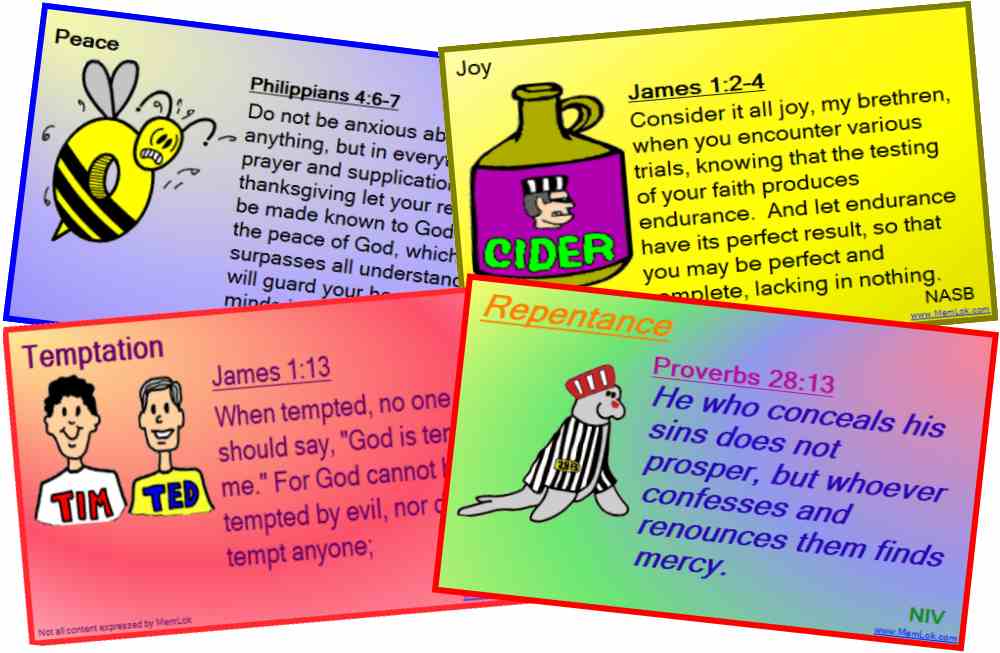
Years ago, I started a search for a means of memorizing Scripture that really worked. I looked up every form of software available, because I was convinced that the computer could help me and my children learn the Word the best. I found and began using Memlok, the only Scripture memory program that uses word pictures to help you remember verses.
The pictures were often humorous which meant that emotion aided the retention of the verses. Memlok, then and now, is a computer program (using more than one Bible version) that designed for one user at a time. As I had young children, I chose to print out business-card size flash cards that the kids and I reviewed, rather than use the program on the computer.
When my family grew, the cards were too small to see. I printed the cards out onto 8.5×11 card stock and we memorized them together that way. I posted the newest card in the kitchen where we could see it frequently. We repeated the verses together as a family and then I asked individual kids to say them, too. The real beauty of Memlok is the built-in review system that will help you remember verses forever! I kept the verses in hanging files based on when they were to be reviewed.
How I Use Memlok Today
Memlok has grown and changed just like my family. Today, I use Memlok’s computer review system on my laptop computer that is connected to our big screen TV. My kids enjoy using the new review options together (like clicking words to fill in the blank). I look forward to using the new option of creating your own pictures for additional verses I want to memorize. This means that Memlok can now easily be used in conjunction with any Scripture memory plan. Does your curriculum call for memorizing certain verses? Are your kids in Awana? Memlok is a great tool for learning those verses by heart.
I spoke with the owner of the program, Drake Mariani, by phone and he encouraged me to let my older students memorize on their own using the new mobile option for their ipods. Yep, the owner called me to talk about how I was using his program in my homeschool. Although memorizing together has worked well for us, I think independent learning is a good option, too.
Memlok is just $29.95, which includes use on any computers in your household. I have received nothing in exchange for this review. I just love Memlok and I love having committed many Scriptures to memory with my children.
What’s worked for you and your kids in memorizing Scripture?
One of my hobbies is trying new applications to make life easier, more productive, or just more fun. These ten applications have been added to by productivity arsenal in recent weeks.
ActiveInbox You may recall my love affair with Goodtodo. The Goodtodo website and accompanying iPhone app helped me get to inbox zero and stay there. There was only one thing I didn’t like about it and that is that it isn’t fully integrated with Gmail, my email client of choice. In other words, while I could forward emails into Goodtodo (and that’s the point), I often had to go back into Gmail to access emails with lots of links, as these aren’t clickable in Goodtodo. I had heard of ActiveInbox before, but was put off by the Getting Things Done moniker. I don’t use every aspect of the GTD approach. What I didn’t realize is that ActiveInbox does everything that Goodtodo does and more. While it’s not meant to be your primary task manager, that’s exactly how I’m using it and I love it. I have the paid version and feel it’s worth every penny.
2. Springpad Everyone knows Evernote and lots of people love it. I liked it, too, but had a particular frustration. I didn’t like that I couldn’t make a checklist that I could easily rearrange or easily make a note that was a task to complete. Springpad does that and more. The user interface is much more appealing to me as well.
3. SmartPad Even though I have my tasks neatly organized in ActiveInbox, I have days when I don’t know how I’m going to fit it all in. One app I love to use in that situation is SmartPad. This iPad app tells you how much you can get done given your schedule and time you have to work. If you dawdle, you can watch the tasks you hoped to accomplish fade from possibility. SmartPad will soon integrate with a SmartDay website which will make the app even more user friendly.
4. Final Version – Wunderlist The man pictured above is not an app, but Mark Forster, who comes up with a new productivity approach every few months. As long as you don’t think of the “Final Version” as the be-all-end-all, but rather as a fun way to gamify your task list, you might enjoy it. I like to use it when I am feeling unmotivated and then Wunderlist is the iPhone app I use. As you tap the stars to indicate that this is a task you prefer to do before the last starred task, the items are put in order at the top of the list for you to begin working on.
5. Clear This is another iPhone app that works for doing the Final Version or just as a great list app. The beauty of it is its simple, clean interface. To make an item a priority, move it up on the list and it’s in the red zone. To add an item between items, simply spread your fingers apart to make room for the new one. If you just want a simple means of organizing tasks in terms or priority, Clear is a great option.
6. Schedule Planner Pro Research shows that we accomplish more of the tasks we schedule. This iPhone app not only allows you to schedule your tasks, but compare what you actually did with what you planned. It’s not perfect, but I love the concept and will use the app when I am working on schedule discipline.
7. Task Current I think of the Task Current iPhone app as a Fun To Do list that I can use to inspire me or even as a reward for doing less-than-fun to do’s.
8. Fitocracy Fitocracy is a seriously addictive website/iPhone app for people like me who thrive on compliments. This diverse community will make you feel like a million bucks for completing your workout, whether you’re a seasoned exerciser or just getting started. There are groups for Christians, but I’ve found the whole community to be very supportive. I was doing squat thrusts at 11:00 p.m. just to finish a “quest” and earn the approval of my fellow fitocrats. What on earth?
9. Daily Feats In case you were wishing there was a pat-on-the-back app for things like housework and parenting, I have good news. Daily Feats gives you points, social approval, and even tangible rewards for doing tasks related to your goals. While company reps are often giving out what are called “props” and sharing links to their products, I’ve found it to be welcome as the products are appropriate to my goals.
10. 750 words Are you a writer who wishes there was a social gaming app to help you get writing done? There is! Earn points for logging 750 words into this writers’ website and compare yourself to others with writing muscle.
What new apps have you found for getting things done?
It isn’t even summer yet, and homeschoolers are busy planning next school year. Take these ten steps to have your best year yet.
1. Inventory
Go through all of your homeschooling curriculum, books, and supplies before you do anything else. Why? So you don’t buy something you already have and also because you will get a very clear indication of what worked and what didn’t.
2. Organize
As you review each item that you’re not currently using, put it into one of four piles: 1) Using in the fall; 2) Using another year; 3) Sell/Give away; 4) Not sure. I like to store everything I am using in the current year in plain sight and everything else out of sight. This is the time of year to sell your unwanted items at used curriculum sales or online. Put “maybe” items in a separate box and review it when your school year is over.
3. Yes
Make a list of what worked well for you this school year–even if it only worked well for a while. What was it that made it successful? Newness, time of year, your energy? These are things you want to keep, return to, or build upon.
4. No
Make a list of anything that did not work for you this school year. What was it that caused the problem? Can it be fixed or does the curriculum or activity have to go?
5. Consult
Discuss your plans with your homeschooling friends. Maybe you can create a co-op, share curriculum, or share driving responsibilities. Perhaps your friends know a curriculum that would work better for you and your children.
6. Discuss
Talk about your impressions of the year with your children. They may have a different perspective on why something didn’t work or may be willing to give up other activities in order to keep a favorite. Discuss your thoughts with your spouse, even if your spouse isn’t that involved in these decisions. Often, talking it out will give you a fresh perspective. Budgetary issues should be addressed during this time.
7. Pray
Prayer can and should be a part of the entire process for believers. I sold a curriculum book for a tiny fraction of its retail value at a used sale last year, only to have a woman tell me she had prayed that she would be able to afford that very book. Our Lord wants to be involved in the smallest details of our planning and when we invite Him to be, we are blessed.
8. Schedule
One of the most common mistakes new homeschoolers (and even veterans like me) make is assuming they can handle more than they can. You will not have time to teach every subject, or even most of them every day. If you are running several days a week, you will not be able to do justice to the core subjects at home. Creating a detailed schedule will help you determine what you can reasonably accomplish.
After completing steps 1-9, you’ll be ready to make your purchase, whether you are online, at a bookstore, used sale, or a homeschooling conference. As the wife of a book salesman, please accept my encouragement to buy from someone you have a relationship with or a family business if the price is at all comparable.
One final bonus tip: start enjoying your new materials now! Why slog through the end of the year with the same-old, same-old when you have inspiring new stuff to delve into?
Are you planning next school year right now? Anything you’re struggling with or particularly excited about?
If you ever sang traditional Sunday School songs, you know you aren’t supposed to hide the light of Christ under a bushel basket. You’re supposed to share the Good News with others. But often, when it comes to our talents and gifts, the bushel basket seems like an acceptable option.
I wrote a book in the summer of 2007 and aside from selling it at several speaking engagements, I haven’t shared it with many people. The copies aren’t under a bushel basket, but rather in a cardboard box under our ping pong table. I decided to take one step to share it and that was putting the link to it on my email signature. A woman I corresponded with saw the link, clicked it, read the sample chapter, ordered the book, read it, and loved it. She has been raving about how it has changed her life ever since.
The point is we all have gifts and talents given to us by God that were meant to be shared–not stored under a bushel basket. Often we get confused and think that we have to be celebrity quality in order to share our gifts. What a shame! I’m no Beth Moore, yet my book has been a blessing to others.
In the interest of sharing my book with even more readers, I am doing an interview with Felice Gerwitz on Monday, April 9th at 11:00a.m. Central time. Hope you can listen in or that you’ll share this link and this blog with the people you know who would benefit from it. All the proceeds from my book are donated to charity and missions.
Are you a closet writer, photographer, artist, singer, musician, athlete, speaker, teacher, leader, or money manager? Don’t hide it under a bushel. Use it for the glory of God and to benefit those around you!
6 We have different gifts, according to the grace given to each of us. If your gift is prophesying, then prophesy in accordance with your[a] faith; 7 if it is serving, then serve; if it is teaching, then teach; 8if it is to encourage, then give encouragement; if it is giving, then give generously; if it is to lead,[b]do it diligently; if it is to show mercy, do it cheerfully. Romans 12:6-8
How are you going to let your light shine this week?
I thought I was done with my series on contentment that begins here, but the Lord had more to say to me about it.
I just returned from a homeschool speech and debate tournament with my oldest son. How strange it is to watch your child agonize over others’ evaluations of him as you once did. I remember the feelings of frustration I had in being praised and criticized for the very same aspect of my speeches. I remember feeling like I wasn’t as good as my teammates who had taken home trophies when I did not. I remember feeling so low at times that I considered quitting. Don’t get me wrong. I think speech competition (and even the constructive criticism I received) prepared me for what I do today as a speaker. I was driven to improve and I learned to use discernment about the feedback I received. (Just because a judge says it, doesn’t make it so.) But competition can also confuse us; I know it does me.
When I watch my son debate, I just think, “Wow!” I am unable to be objective about how his speaking skills compare to others’, because I love him so much. To me, he isn’t better, just beloved.
One of them, the disciple whom Jesus loved, was reclining next to him. – John 13:23
I have heard a number of teachings on John’s reference to himself as “the disciple whom Jesus loved.” Most of them emphasized that Jesus spent more time with John and as a result, was closer to him. I can’t deny that. But I don’t think that John was emphasizing that he was better, just beloved. The most amazing thing about Jesus for John was that He loved him.
When I am tempted to be discontented about not being better or my children not comparing to others, I want to remember this: I am the disciple that Jesus loves. When He looks at me, He sees what I see when I look at my son. Wow.
What do you think? Does Jesus spend time considering which of us is better?
I’m a Christian psychologist turned homeschooling mother of six. My life can be a little crazy, so I look for sanity-saving ideas to use and share. I hope you’ll read my About page to learn more.