Automatic Scheduling for Busy People
 You have some things you have to get done today, some projects that have deadlines looming, and the day-to-day tasks that you should attend to. Then there’s the big list of things you’d like to get to sometime.
When it comes time to decide what you should be doing right now, it’s overwhelming.
Ask me how I know!
As a busy mother of six (five I’m still homeschooling), blogger, and aspiring entrepreneur, I have struggled to answer this question:
What should I be doing right now?
I’ve certainly made a lot of progress in managing time demands. I’ve learned the power of:
- Routine
- Pomodoros
- Inbox Zero
- Prioritizing
- Task collection using ToDoist
- Outsmarting my inner rebel’s procrastination using approaches like randomizing tasks
- And especially scheduling
I did a year’s worth of experiments in improving my productivity, but to be honest, I still hadn’t found the answer–my personal holy grail of getting more done. Honestly, I didn’t think there was one. Instead, I decided, productivity was really about making small improvements over time.
And I don’t disagree with that. But it didn’t keep me from continually looking for “the answer.”
Months ago, I heard about another scheduling app. I wasn’t interested at the time. I was pretty satisfied with the app I was using and I had, thankfully, become more reticent to try app after app. At one time, I was a true addict. I added the link for the app to ToDoist with no due date.
As I was going through my tasks with my new passion for purging, I came across the link and decided to check it out. It seemed very much like SmartDay or Timeful–both apps I had benefitted from using. But for some reason, I watched the video for Skedpal:
Even as I decided to sign up for a beta version, I didn’t think Skedpal was anything new. Once I got my account, I began setting it up and watching the training videos.
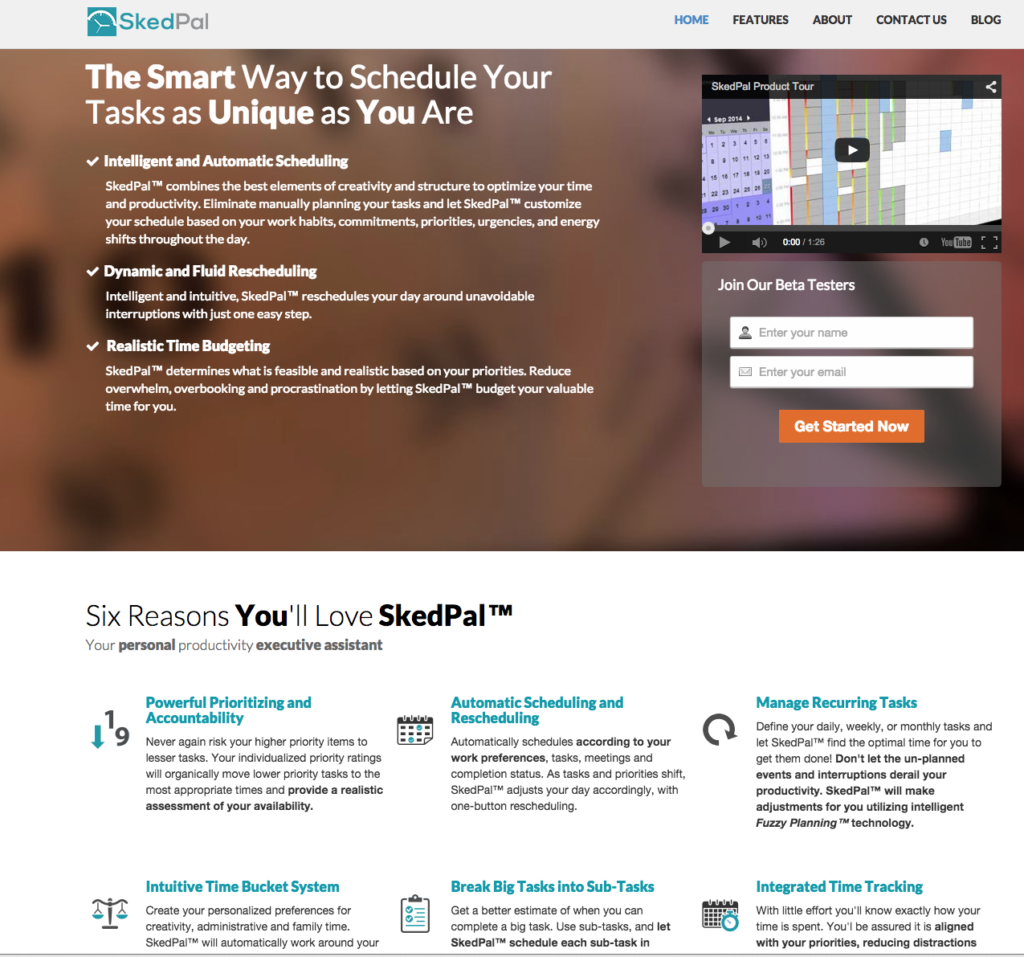
I spent time learning the system and setting up, only to anticipate that it would be like so many other automatic task apps. In other words, I expected Skedpal to tell me to do something that I did NOT want to do–at least when it told me to do it. That would either be because of my natural rebelliousness or because I would be told to run errands at 10 p.m. And then I anticipated dropping the app.
But I was wrong.
Skedpal, for me, IS what I have been looking for. After using it for a week, I considered abandoning everything to work for Skedpal–so great was my fervor for this little program. (Hey, Skedpal developers, don’t worry. I’ve gotten ahold of myself).
Now, if you’re anything like one of my productivity pals, you’re asking WHY? What makes Skedpal different and how has it completed my productivity puzzle?
#1 Skedpal calculates everything that your poor, tired brain can’t.
You give it absolutely all the information that you have in your brain and your trusted systems. Specifically, you tell Skedpal:
- the timeframe within which you’d like to complete a task with a deadline
- how long you think the task will take you
- the priority of the task
- your schedule (using an import of Google calendar)
- your preference for when to complete the task (more on this in a minute)
Within seconds, Skedpal calculates an ideal schedule for you. You KNOW what you should be doing right now. It really is like having a personal assistant who gets you.
#2 Skedpal helps you break big projects down into doable chunks.
I haven’t been one to make use of subtasks very often. But with Skedpal, it’s easy and rewarding. You can’t enter a task that takes hours and hours into the system. Instead, for longer tasks, you have to add subtasks (in order) and how long each part of the project will take. This has been unbelievably helpful to me as I work on my homeschooling curriculum. Not only am I making my project manageable, but I am coming up with a reasonable estimate for how long it will take me.
#3 Skedpal makes free time a reality.
I have wanted to have Sundays free for so long, but it just never seemed to happen. It didn’t seem possible to work ahead when I had planned activities that interfered with my normal routine. But Skedpal makes sure that I am getting things done within my work hours, because it doesn’t have late evenings or Sundays as a scheduling possibility.
I can’t even express the wonderful feeling it is to relax, do things with my family, and do things I never felt I had time for–all guilt free. Everything else is completely under control.
#4 Skedpal makes work motivating.
I was sure that I would rebel against the Skedpal schedule. But to my surprise, I realized that the program had chosen the perfect time for me to do various things like grocery shop and do my laundry. Before Skedpal, I would tell myself that I would do it “later.” That often meant I was doing these things at the last minute, on Sunday, or when I was really, really tired. When I look at my Skedpal schedule, I realize that there IS no better time to do it, so I don’t put these tasks off.
The second reason that Skedpal is motivating is because it has that randomizing effect. I get so excited when I hit the reschedule button. I don’t know what it’s going to tell me to do and that’s motivating and even FUN.
#5 Skedpal works beautifully with your established routines.
I already know that Thursdays are blog days and any Saturday time that isn’t committed to kids is reserved for curriculum writing. Skedpal works with these routines like no other scheduling program. You create a time map for each of your routines.
For example, when I added this post as a task to Skedpal, I added it to my blogging time map. Skedpal then knew that I preferred to work on it on Thursdays. What makes Skedpal even smarter is I can tell it my preferences within that time map. For example, I prefer not to do blog writing on Fridays. But if I have to write a sponsored post and I’ve had a particularly busy week, I tell Skedpal by marking times with colors that I will work at those times if necessary. In other words, it’s realistic! Sometimes you have to work longer hours and within Skedpal, you make times available for that. I should note that Sundays and late evenings are NOT an option, however.
You can easily add recurring tasks to Skedpal. This is how I handle the little tasks that are too small to add to Skedpal on their own (30 minutes is the smallest time required). I have a daily recurring task called Admin. During this time, I empty my physical and email inbox, and refer to my ToDoist tasks for the day. I have been amazed by how easily I complete my ToDoist list now that my “big rocks” are already in my Skedpal. All that are left are one-off’s that I am happy to complete.
#6 Skedpal helps you have a realistic workload.
If Skedpal can’t fit all your tasks within the timeframe you’ve given it, you’ll get a warning. That’s huge. Most of us go through life having no idea if we can add one more thing to our list or not. So we usually say yes and then fret about how we’re going to get it all done or we wonder why we haven’t been able to read a book for fun in ages. Skedpal puts an end to that.
From now on, if I receive a possible to-do from someone (or even from my own overactive brain), I will add it to my Skedpal and see what happens. If it doesn’t fit, the answer will be no. If a lot of my scheduled tasks turn red (meaning that they are urgent), the answer will also be no.
If I have a conflict with my existing workload, I can make changes to make things work. I can extend a deadline, cancel an event or activity, or I can work extra when I get unexpected free time. Meanwhile, I am stress-free. Can I say how HUGE that is for me?
A few negatives
Sync with Google calendar is not automatic. I honestly don’t mind that, but some of you might. The other issue is that you cannot choose which Google calendars you want to sync. I ended up deleting one calendar that I didn’t want blocking scheduling.
The program includes a timer which is used to help determine how much time you need scheduled to complete the task after your current work session. This is both good (it helps me focus) and challenging (there is no mobile app yet and I forget to turn off the timer).
Even though there isn’t a mobile app yet, I can easily see what I’m supposed to be doing, because I have a Skedpal calendar as part of Google’s.
Skedpal is still in beta and have urged me to offer feedback. I’m sure they would be happy to hear yours.
Here’s the pitch…
This is the point at which if I were an affiliate of Skedpal or if Skedpal sold for $29.95, I would make the big sales pitch about all you were getting for your money. But, wait for it…
Skedpal is FREE.
At least for now. I’m so grateful I could kiss the developers. But at this point I’m so crazy about it, that if they stopped supporting it, I might have to hunt them down. 🙂 Just kidding.
My husband with his little 3-item to-do list does not need this program. If you do, because you have no idea what you’re supposed to be doing right now (besides pinning and sharing this post), give it a try. Watch the training videos and keep tweaking your time maps until you sigh with relief as you gaze at your perfectly planned schedule.
I’d love to hear what you think on Facebook, Twitter, or Google+.
read more