I love productivity books, blogs, and podcasts, but I REALLY get excited about productivity tools that make my life easier. Here are six that I was crazy about in the past year that you may want to try too.
Scheduling is the number one way I get things done now. But because I always tend to overestimate what I can accomplish in a day, I LOVE Timeful. I can automatically determine what I can reasonably do and at the same time, get suggestions of when to do certain tasks or habits I’m working on.
A second benefit of Timeful is that I have a record of what I’ve actually done during the day as I have a Timeful calendar set up to sync with Google.
This is an app I recently discovered and it’s perfect for reminding me of things I want to do regularly. Unlike most other apps, it isn’t annoying. The UI is gorgeous and the app functions like a nice friend who gently suggests I do something I said I wanted to do.
I use this app every day for chore management. I’ll explain how in a future post. But the app saves me enormous time refereeing squabbles with my kids! I also use it when I’m feeling stuck and unwilling to follow my schedule. I’ll explain how in tomorrow’s post on productivity hacks.
Focus at Will is a website and app that produces music to help you focus and get more done. Unlike most music websites, Focus’s mission is to keep you from noticing the music at all. In fact, if you notice it, you’re supposed to skip to a different track.
Focus offers a free trial. During mine I determined that Ambient noise works best for me. While I was enjoying increased productivity, I wasn’t enjoying the music. So I tried listening to Pandora while I worked. MUCH better! I enjoyed the songs so much that I would stop and sing along and then I would research the artists and would be sure to take the time to give a thumbs up to songs I liked. Whoops.
I went back to Focus@Will and absolutely love that I can set a timer for a work period and can then report how focused I was. Unless I’m interrupted by someone, I find 100% focus. If I’m around the kids, I wear headphones. If not, I play it over my computer speakers. I would love to know if it works as well for work away from the computer. If you try it, let me know!
I bought this tablet with a keyboard that looks like a netbook on Cyber Monday for a mere $260. I cannot express how crazy I am about it, particularly because it uses the full Windows operating system. One of my huge frustrations with the iPad as a writing tool is that isn’t possible. I am using it only for reading and writing. I had a large monitor and full-size keyboard that I wasn’t using, so I set up a desktop work station at home like this.
When I’m ready to write on the go, all I have to do is turn it off, unplug it, and pop it in my purse. One of the first things I downloaded was Scrivener which I also can’t recommend enough for writers.
A friend sent me a link to this at the end of the year and I was so excited about it, I had to order it. What I love about it is the huge emphasis on goals. Every month and every week, you are asked to specify your goals, why you want to achieve them, and the steps needed. There are also half-hour blocks all day for planning time. Sometimes I want to see what I’m doing on paper, rather than on my little iPhone screen. This is just the ticket!
The paper of this planner is like silk. It works perfectly with my Frixion pens.
The truth is, we don’t always have time to read full-length books to improve our productivity. That’s where blogs come in. In just a few minutes, we can have the inspiration we need to get more done. Here are six of my favorite blogs from last year that I recommend (in no particular order).
Offering a mix of productivity content that appeals to a wide audience, 99U is a place I often find myself, usually following a link from Google+ Productivity.
I don’t know of a better blog for keeping the faith front and center in discussions of productivity. If you’re a Christian, you don’t want to miss this blog.
I started reading Hugh’s blog this year and look forward to new posts every Sunday. I find so many of his posts compelling, which is impressive given how much I’ve read on the topic.
These epic blog posts are like mini books on specific topics incorporating research, videos, and tips. Very impressive as I know just how long these kinds of posts to write. Therefore, I don’t write them.
This post on how to stop procrastinating is an example. If you watch the videos and read all the enticing link, you will BE procrastinating. Just warning you.
If this is one of your favorite productivity blogs, be sure to subscribe to the productivity-only posts for Psychowith6. What are your favorite productivity blogs?
But for me, this is a year of being truly productive and realizing the dream of writing and publishing my own curriculum. (For you homeschoolers and parents with kids in elementary school, I will share more as soon as I can.) For now, I came up with a compromise. This week I will share 5 posts about my productivity favorites of the year. These are the books, websites, podcasts, tools, and hacks that I loved (that didn’t necessarily come out last year) that I think you might enjoy too.
When you are someone who is already more productive than most people you know, how can you still make improvements?
At first it may seem to be an easy question to answer: just browse the Internet, pick out a bunch of websites or books and find some tips, tricks and shortcuts. Try a bunch of them and see what works.
If you are someone who has lots of time on your hands, this approach might bear some fruit. In times past, when there were only one or two credible resources available, you had no choice. Now, however, you have a plethora of advice at your fingertips, but no way to choose between different sources. Therefore, you waste a lot of time in your attempts to get just a little bit better.
Is there a better way?
There is. Just look at the way top athletes learn. They don’t chase after trivial bits of advice from everyone they meet — that’s a recipe for disaster, or at the very least, permanent distraction. Instead they find ways to focus their energies on precise behavior changes, in small doses.
Michael Jordan put it well. “My attitude is that if you push me towards something that you think is a weakness, then I will turn that perceived weakness into a strength.”
He was fortunate: he had others around him like teammates, coaches and opposing players who helped him find potential areas of growth. You probably aren’t as lucky. In the workplace, as in everyday life, there remain few clear cut measures of success and few people who can give clear feedback. Instead, you need a way to assess yourself and provide you with the same edge that Michael Jordan had at the height of his days in the NBA.
Your Time Management Autobiography
If you have ever read a time management book or sat in a productivity workshop you probably found yourself discarding many of the specific practices and habits the author/instructor recommended. Others may have seemed to be in love with them all, but some struck you as unnecessary for your situation. Why the difference?
It’s because each of us has an individual time management autobiography which has brought us to this point place in time.
Your biography started at the age you learned to tell time, which for most people happens before 10 years old. You were probably taught that time was a real substance that needed to be learned and understood.
Once you mastered the concept, it didn’t take long for you to create what are called “time demands” — internal, individual commitments to complete actions in the future. They are psychological constructs, according to academics Dr. Wendy Wood and Judith Oullette who labeled them “conscious intentions.” With MacGyver-like ingenuity, you didn’t stop there — you also taught yourself how to deal with time demands each day.
Unfortunately, these two life-changing events go unnoticed by most of us. As important as they are to our future success in life, we usually can’t recall either when we discovered time or started manipulating time demands.
However, once you started creating time demands, you exerted a supreme effort to keep them alive long enough to get the prescribed actions done. If you are like most people, the first thing you tried was your memory. Over time, you were forced by its limits to use other devices. For example, the chances are good that if you are reading a blog post such as this one on Psychowith6.com, you taught yourself to use a To-Do list, either written on paper or kept on an electronic device.
The transition you made was typical: the research shows that as time demands increase, over time we progress through a number of turning points. The first was the decision to use memory (rather than rely on chance), while the second was to replace memory use with a To-Do list. Perhaps you have also reached the third: the use of multiple lists rather than a single list. Some have even reached a fourth: they tend to be time-starved and use a detailed schedule, without any To-Do lists at all.
These turning points — the moments when we decided to switch methods — are an all-important part of our biography. Dr. Key Dismukes and others have shown that we commit fewer errors when we switch to the right technique at the right time: the one that happens to match the volume of time demands we are trying to process daily. Stress occurs when there is a mismatch, and we experience persistent failures.
Now, see if you can fill in some holes in your time management biography. Which tools do you use to manage time demands? Which ones predominate? When did you hit some of these turning points and start to change your habits? What habits, practices and rituals did you unlearn, then learn?
These aren’t easy questions to answer because we hardly noticed them happening, but your answer provides a beginning — an understanding of how you came to do what you do, and why.
Your Current Profile
Your history has brought you to this moment, the time when you are using a particular set of habits, practices and rituals developed over time. It’s responsible for every single one of your achievements. However, if you are experiencing time-stress, the answer probably doesn’t lie in tips and tricks randomly tweeted out into cyberspace.
A better place to start is with an important part of your biography — your current day assessment. For example, in 2008, Dr. Lydia Liu and her team of researchers gave one of the few self-assessments for adolescents to over 800 seventh-grade students. They found that they were well on the way to developing their own system which, in general, was less sophisticated than those being used by college students — a great piece of information to have for a parent who is guiding their kid’s development.
In my book, Perfect Time-Based Productivity, I also provide a self-assessment covering over 40 critical skills that, like Dr. Liu’s work, results in a personal profile. This profile is the end-product of your autobiography, but you don’t need to know the details of each turning point to develop it — it’s just better if you have that knowledge as you can understand why you possess certain behaviors and not others.
These are just two methods. You can also keep a detailed diary of your behaviors, tracking repetitive errors as they occur. Hiring a coach who can tell you what your developmental needs are is another. You can also develop your own assessment. In my book, I share the methodology I use so that you can create an assessment based on any best-practice whenever you want.
The result is the same whichever path you take: an in-depth understanding of your current skills which reveals the most obvious gaps. A good assessment may reveal the fact I found in hundreds of self-assessments delivered during training; most of us had no formal training in time management during our adolescent years. The result is predictable: unorthodox profiles that owe more to Rube Goldberg than scientific research. Dr. Liu makes the point: figuring out this piece of our autobiography is critical if we want to be effective in the future.
Your Future Biography
In my book I tell the story of a fictitious CEO named Rebecca. She made the switch from one technique to another in response to increasing responsibilities, first at school and then in her career. She had help along the way, but the transitions were still difficult to undertake because our ingrained habits, practices and rituals are unlearned slowly.
Advancement up the corporate ladder is one guarantee of greater time demands. Others include having children, getting married, undertaking a degree part-time and taking care of an ailing parent. All of us who have swapped a feature-phone for a smartphone know that technology also changes the way you deal with time demands. In all these examples, the outcome is the same — you need to upgrade your methods.
Fortunately, if you have completed your autobiography you know exactly where to start. Your self-knowledge sets you apart from others who feel the need to change, but only have random tips, tricks and shortcuts to choose from. Their job is much harder — and it takes a much longer time.
Armed with your autobiography, however, you can ignore irrelevant advice, snazzy technology upgrades and silly shortcuts that have nothing to do with your needs. As opposed to chasing down trivial recommendations and advertisements, you can commit yourself to making slow, steady progress — the kind that’s unfashionable, but ultimately works.
In this way you can write your future biography — one in which you improved your skills at will with the awareness, intuition and skills of an adult. This gives you a way to keep your peace of mind regardless of the challenges life might bring.
Francis Wade is the author of Bill’s Im-Perfect Time Management Adventure, (http://perfect.mytimedesign.com) and Perfect Time-Based Productivity and a consultant who started Framework Consulting Inc., after leaving AT&T Bell Labs in 1993. Today, he lives in Jamaica, inspired by the differences he’s discovered between productivity in the Caribbean and North America. It’s led him to continue the learning he started as a student at Cornell University, where he completed Bachelors and Masters degrees in the discipline of Operations Research and Industrial Engineering. He’s been a proponent of Time Management 2.0, a robust set of ideas that are challenging the conventional wisdom in the area of time-based productivity. When he is not working, Francis is an enthusiastic triathlete.
References
Dismukes, R. (n.d.). Prospective Memory in Workplace and Everyday Situations. Current Directions in Psychological Science, 215-220.
Liu, O. L., Rijmen, F., Maccann, C., & Roberts, R. (2009). The assessment of time management in middle-school students. Personality and Individual Differences, 47(3), 174-179
Ouellette, J., & Wood, W. (1998). Habits and Intention in Everyday Life: The Multiple Processes by Which Past Behavior Predicts Future Behavior. Psychological Bulletin, 124(1), 54-74.
I was reading a question posed on Mark Forster’s forum about whether doing the opposite of what others generally do is effective when it comes to productivity, and I realized that I have found that it is. Here is the advice I have NOT followed with great results.
#1 Collect all your to-do’s into one trusted system.
The gurus who preach this haven’t met people like me who can produce a potential task a second.
Every time I’ve followed this advice, I’ve become overwhelmed and have shut down. It becomes impossible for me to sort out the things I must do from the things I would like to do. A someday/maybe list within the same trusted system doesn’t work for me either. I need to keep all of my ideas and potential tasks in a separate place, so I don’t become confused. Right now, all of my legitimate tasks go into ToDoist and everything else is added to Evernote. Evernote is a great place for me to put things to cool off. I find there are very few of them that I want to do anything with when I review them later.
While it’s a good idea not to have your tasks in many different places, keeping absolutely everything in one place keeps me from getting things done.
#2 Get everything done on today’s list.
I’m like so many of David Allen‘s clients who are desperate for a “win.” But defining win as getting everything done on my list for today does not work for me.
Predicting the demands on my time for any given day is as accurate as a weather forecast. Things happen. People and circumstances can keep me from getting everything done, but so can I. I have no way of knowing when I will run out of gas physically or emotionally. Of course, I do what I can to improve my energy levels, but some days I’m unpredictable. I suddenly need a nap or idle entertainment to recharge.
When I use this principle of completion to evaluate my productivity, I feel like a failure and am less motivated, not more. Instead, I schedule my tasks using Timeful and if I get MOST of my tasks done for the day, I count it as a win.
#3 Don’t procrastinate.
Of course, there are times when procrastination makes more work for us and leads to strained relationships and poor self-esteem. But I’ve learned to be grateful for procrastination.
Procrastinating has kept me from working on projects that I wasn’t committed to. Sure it would have been better if I had said no in the first place, but sometimes I don’t consciously realize that I don’t want to or shouldn’t be doing something. Procrastinating has also lessened my workload. Many times I have put off doing something only to discover that it didn’t need to be done or someone else did it. Procrastinating on purchases has saved me money as well. I buy a tiny fraction of things I add to my wish list on Amazon. I allow the desire of the moment to cool. Mark Forster’s Do It Tomorrow is contrary to the advice not to procrastinate with excellent results.
Procrastinating isn’t always a bad thing and can actually help me get more done.
I’m someone whose energy and achievement are directly tied to being challenged. I would rather delegate many things I AM good at, because they’re boring and tedious. Things I’m not good at inspire me. I want to learn how to do them so I can get more done. A second problem I’ve found with delegating things I’m not good at is I lose control. My productivity slows down on specific projects as I wait for the delegated work to be done. I can also be taken advantage of by people who know more than I do, because they can tell me how long something will take and how much it will cost and I won’t know any better.
While delegating is the right choice in some circumstances, I’ve found that much of the time I shouldn’t delegate what I’m not good at.
#5 Don’t change systems frequently.
The typical advice is to find one approach to managing your tasks and stick with it. Fiddling with your system just wastes time, the gurus say. But as someone who intentionally changed systems nearly every week during A Year of Living Productively, I learned that doing the opposite has been very effective for me.
Looking back at the times I’ve changed approaches to tasks, one thing is clear: I didn’t make changes during times of high productivity. Instead, I made these changes when my productivity and motivation were low. I would read a new book, try a new app, or scour the Internet for a new way of thinking about work and BAM, my productivity would dramatically increase. I got out of bed excited to use my new system and found myself getting twice as much done.
Rather than being a means of wasting time, changing systems has been a consistently effective way for me to get more done.
How about you? Do you do the opposite of the standard advice with good results?
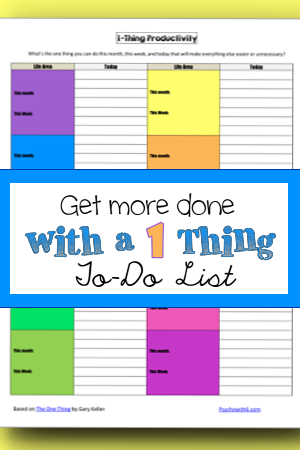
A friend asked how I used the approach. I explained how I am using it to improve my marriage and work with my digital task list. She mentioned that she wished there was a good paper list to be used with this approach and I was inspired! Read on for what I shared with her and what I ended up using to manage my own tasks.
Gary Keller urges his readers to determine the one thing that would make the biggest impact in their lives (usually that will be the thing that makes the biggest impact in others’ lives, too). Once we know that, we can determine the one thing that would have the biggest impact on our lives in the next five years, next year, and so on. The great way he defines the one thing is:
the one thing you can do that will make everything else easier or unnecessary.
If you don’t yet know what you want to do with your life, I urge you to spend time praying and thinking about it. The book itself may help your thinking. Once you know your ultimate goal, deciding the one most important thing to do becomes easier. As a busy homeschooling mom with many interests, I loved the concept of choosing the one thing in every area of my life. I can’t possibly choose only one important area of my life to focus on! If you get stuck choosing one thing, remember that choosing doesn’t mean you can’t do anything else–it just means that you have chosen what you think is the most valuable use of your time for now. Perfectionists, take note: choose what appears to be the one thing. That’s good enough!
For inspiration on using a one-thing approach, listen to Jeff Sanders’s podcast on the subject.
How I’m Using The One Thing to Build My Marriage
I realized from interviewing Dr. Don McCulloch, author of Perfect Circle, that I longed for my husband to ask me what he could do to make the marriage of my dreams a reality. The problem was, like most men, he was inclined to guess what I needed and would give me that instead. Inspired by The One Thing, I asked my husband what the one thing was that would make his day easier (that I could do) and he told me. He was very open to hearing the one thing he could do to make my day easier, too. In fact, he is asking me this question on his own now. Wow!
I recommend asking your spouse what s/he needs first and then telling your spouse what you need most and make it a daily habit. Morning works best for us. Before you know it, your spouse will be asking you first!
How I Use The One Thing to Get More Done with ToDoist
Because I already have my tasks sorted by life area (colored categories) in ToDoist, it’s easy for me to review these and choose my one thing each day. I have tasks dated (something I accomplish during my weekly review) for the week, making choosing one to make top priority quick and easy. Rather than work from the Today view, I keep my list open to Top Priority tasks until they’re complete. I take all of this one step further by scheduling time for each “one thing” in Timeful. I explain more about this in 6 Important Habits for Getting More Done.
How To Use The One Thing with a Paper To-Do List
I’m absolutely crazy about digital task solutions like ToDoist, but I’m also crazy about pretty paper lists–the more colorful, the better. When my friend mentioned a paper list, I had to create a weekly form that would work for 1-Thing Productivity. Each life area has a color and a space for one monthly and weekly thing that will make everything else in that life area easier. What do I mean by life areas? The best way to explain is with examples. My life areas are church/faith, marriage, kids, homeschooling, blog, business, relationships, organization, personal, and scrapbooking.
The beauty of this list is the linear connection between your monthly and weekly 1-things and your daily 1-things. Every day, you list a new 1-thing per life area and check it or cross it off as you complete it.
A few notes. Sometimes your 1 thing won’t correspond with your weekly and monthly 1 thing. That’s ok. The form exists to keep your longer-term things top of mind. You may also have days when you don’t need to do anything in a particular life area. That’s ok, too. The form serves as a reminder of all the important aspects of your life and where you’re devoting the most time. If I don’t complete an area’s “one thing,” I rewrite it for the next day IF it’s still the one most important thing I can do.
Finally, you may have other must-do’s for a particular life area. You can approach this in a few different ways. First, list the rest of your must-do-today’s on the back of the form under today’s date. You could work on them as you complete the various 1 things. Second, you could keep these other must-do’s on a separate list that you only tackle once all of your 1 things are done. Lastly, you could schedule your “one things” and everything else you want to accomplish today on your calendar or datebook or using an app like Timeful. I use the latter approach.
Whatever method you choose, the 1 Thing approach to getting more done is really powerful. What 1 thing could you do right now that would make the rest of your day easier? Let me know how this works for you.
I’m a Christian psychologist turned homeschooling mother of six. My life can be a little crazy, so I look for sanity-saving ideas to use and share. I hope you’ll read my About page to learn more.